
Podcast show notes are the written text that goes with an episode: a short summary, the key takeaways, chapter markers, links to the people and things mentioned, and one call to action. Write them from the transcript, match the length to your show, and check the names, links, and timestamps before you publish.
That’s the whole job. Most guides make it sound bigger than it is.
Here’s the part they skip. We write show notes for client episodes every week, and we no longer write them mainly for listeners. We write them for search engines and AI assistants, which mostly read text, not audio. Every Episode Kit includes an episode title and SEO show notes, and this post shows the exact template we use, plus three versions you can copy.
Key takeaways
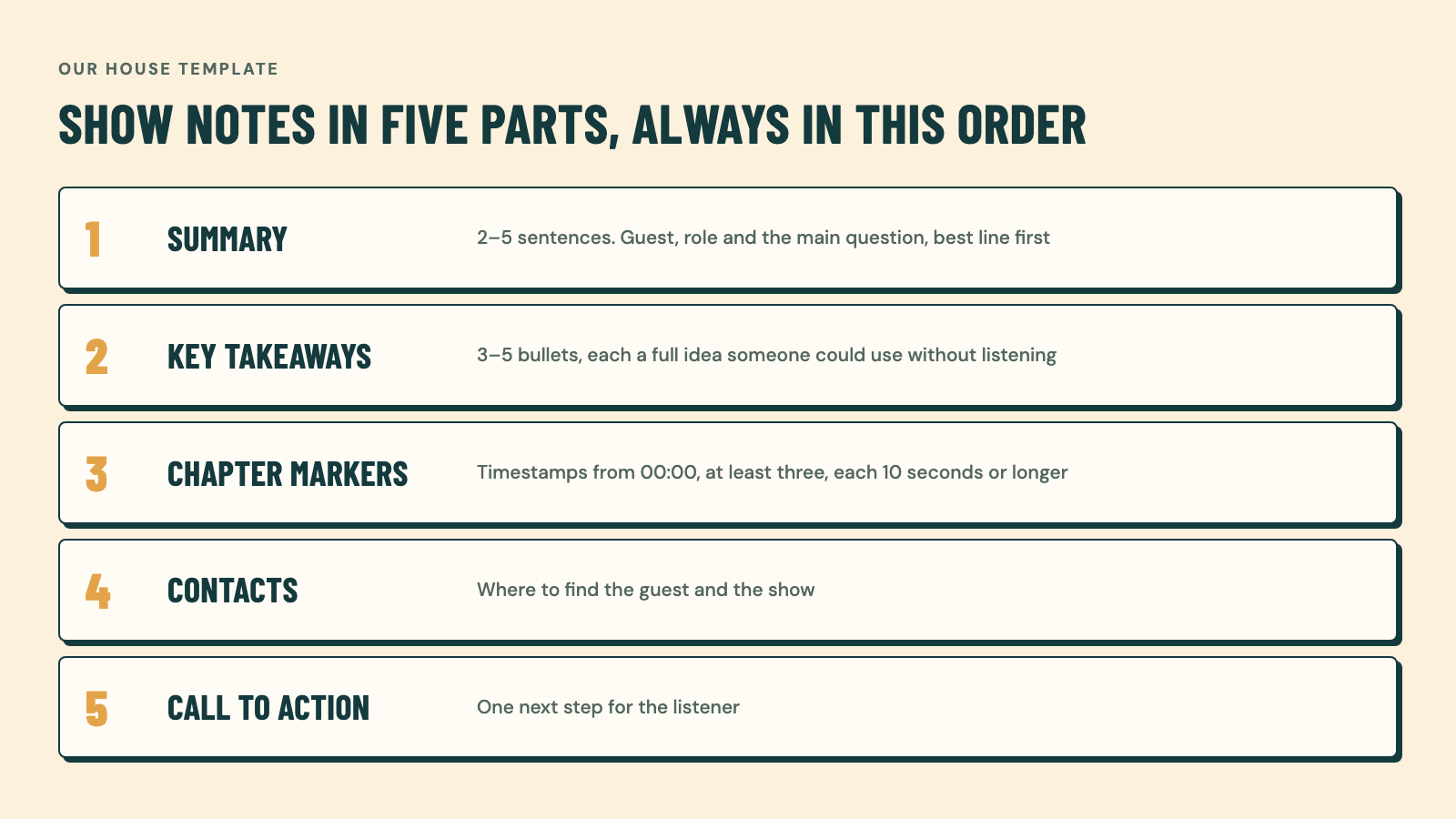
- Podcast show notes have five parts in our house template: summary, key takeaways, chapter markers, contacts, and a call to action.
- Today, show notes do most of their work for search engines and AI answers, so they need real context, not a teaser.
- B2B shows should write longer show notes for search and AI context, while entertainment shows can keep them short and chatty.
- YouTube chapters only work if the first timestamp is 00:00, there are at least three, and each chapter runs 10 seconds or longer.
- A short check of names, links, and timestamps matters more than polishing every sentence.
What are podcast show notes?
Podcast show notes are the text attached to a single episode. They tell a reader, a search engine, or an AI tool what the episode covers, who is in it, and where to go next.
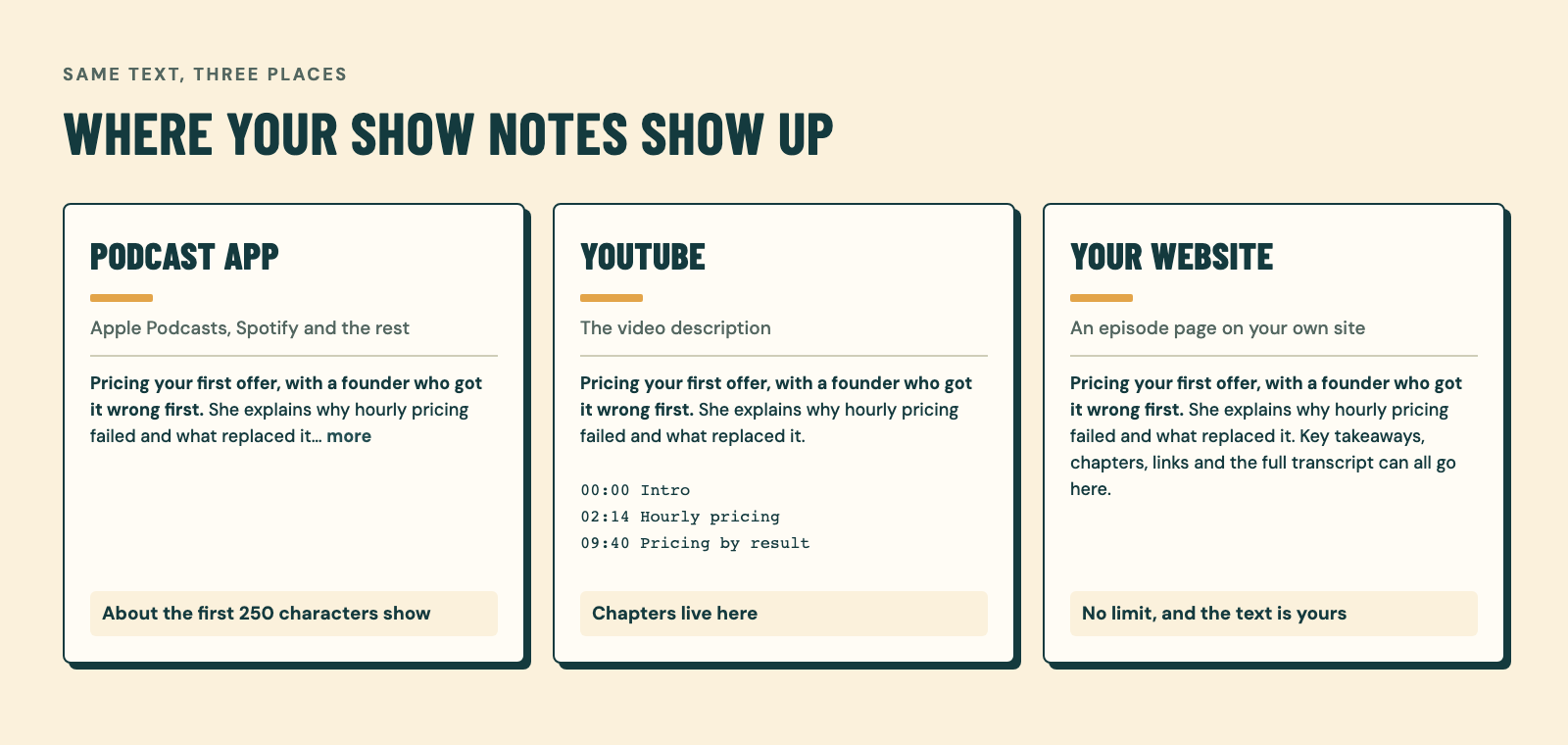
People also call them the episode description. In practice it’s the same text, placed in three spots:
- Your podcast apps. Apple Podcasts, Spotify, and the rest show it under the episode. Apple allows up to 10,000 characters for an episode description.
- YouTube. For a video podcast, the YouTube description is your show notes. It’s also where chapters live.
- Your website. An episode page on your own site, where there’s no character limit and the text is yours to keep.
So “show notes vs episode description” is mostly a naming question. The real difference is the platform. Each one cuts the text at a different point and handles links and timestamps its own way.
Who podcast show notes are really for
Ask most podcasters and they’ll say show notes are for listeners. The numbers don’t back that up very well.
In a 2018 School of Podcasting poll, 136 of 360 listeners (38%) said they look at show notes. That’s an informal poll, and it’s old. Still, it matches what you’d guess: most people press play and never scroll down.
Our view is simple. Show notes are now written mostly for AI and search. People used to call this SEO. Now you’ll hear AEO or GEO, which mean showing up in AI answers. The name matters less than the job: the show notes give AI the context of the episode. When someone asks an assistant a question your guest answered, the show notes are often what the assistant can read.
That changes how you write them. A teaser like “You won’t believe what Sam said about pricing” tells an AI nothing. A plain summary that names the guest, their company, and the three ideas they shared tells it everything.
Listeners still matter, so put the best line first. Spotify says the first 250 characters are what’s visible before a listener has to expand the description. Those first lines are for the person deciding whether to press play. Everything below them is for search, AI, and the few readers who scroll.
What to put in podcast show notes: our five-part template
Our house template has five parts, always in this order. The transcript comes in, and each section gets written from it. It’s not difficult, and it shouldn’t take long.
1. Summary
Two to five sentences on what the episode is about. Name the guest, their role, and the main question the episode answers. Put the most useful sentence first, because that’s the part apps show before the cut.
A good summary reads like the answer to “What’s this episode about?” said out loud. Skip “In this episode we dive into.” Start with the subject.
2. Key takeaways
Three to five bullets, each a full idea someone could use without listening. This is the section AI tools quote most easily, because each bullet stands on its own.
Write them as claims, not topics. “Price by recording length, not by hour” is a takeaway. “Pricing” is just a word.
3. Chapter markers
A timestamp and a short label for each part of the conversation. These are your podcast chapters. For video podcasts, they become YouTube chapters, and YouTube has firm rules. According to YouTube’s chapter guidelines:
- The first timestamp must be 00:00.
- You need at least three timestamps, listed in ascending order.
- Each chapter must be at least 10 seconds long.
Break any of these and the chapters simply don’t appear. Labels should say what happens, like “06:40 Why the first client said no,” not “Part 2.”
4. Contacts
Where to find the guest, the host, and anything mentioned in the episode: website, LinkedIn, the book, the tool. Paste full URLs, so a reader can still copy the link where an app doesn’t make it clickable.
This section is also good for search. It ties the episode to real names and real sites.
5. Call to action
One thing you want the listener to do next. Subscribe, book a call, join the newsletter, or leave a review. Pick one. Buzzsprout gives the same advice: limit yourself to one CTA per episode so you don’t overwhelm listeners.
If you’d rather see how this fits into a full production week, here’s how our process works.
How long should podcast show notes be?
It depends on your show. That’s the honest answer, and it’s the one we give clients.
B2B and educational shows: go longer. If the show exists to bring in clients or build authority, you’re writing for search and AI. Give them more context: a fuller summary, five takeaways, every company and tool named in the contacts. A few hundred words is normal.
Entertainment and personality shows: keep it short. If people listen for the hosts, the notes can be two or three conversational sentences, a few chapters, and one link. Nobody needs a white paper about a comedy episode.
Either way, stay inside each platform’s limits:
| Where | Limit (as of November 2026) | What it means |
|---|---|---|
| Apple Podcasts | Up to 10,000 characters per episode description (Apple) | Room for the full five-part template |
| Spotify | First 250 characters visible before “more” (Spotify) | Put the hook in the first line or two |
| YouTube | Up to 5,000 characters (YouTube Help) | Fits the template plus chapters |
| Your website | No limit | Best place for the long version |
Spotify also says three to four sentences are usually enough for the description. That fits the short version well. For a B2B show, use the long version on YouTube and your website, and lead with a tight summary everywhere.
How to write podcast show notes, step by step
This is the workflow behind our template. It works whether you use an AI tool or write by hand.
- Start from the transcript. Get a full transcript of the final edit, not the raw recording. Cut sections won’t end up in your notes by mistake.
- Write the summary first. One question: what would a busy person need to know to decide to listen? Answer it in two to five sentences.
- Pull the takeaways. Scan for the moments where the guest gives advice, a number, or a strong opinion. Turn three to five of them into one-line bullets.
- Add the chapters. Mark where each topic starts in the final video. Start at 00:00 and label each chapter with what happens in it.
- List the contacts. Every person, company, book, and tool named on the show, with full links.
- Add one call to action. The same one you said on the episode, ideally.
- Do a five-minute check. Then publish.
That last step is the one that matters most. We don’t go through show notes with a fine-tooth comb, and you don’t need to. But a quick check of the facts catches the errors that embarrass you.
AI transcripts get words wrong. In one r/podcasting thread about posting transcripts, a podcaster’s transcript heard “bat ropes” as “bathrooms.” The advice in that thread was blunt: proofread it.
Your five-minute check:
- Every name is spelled the way the person spells it.
- Every job title and company is current.
- Every link opens the right page.
- Every timestamp matches the final edit.
- Every number matches what was said.
Podcast show notes templates you can copy
All three templates use the same five parts. Copy the one that fits your show and swap the brackets.
Template 1: B2B or educational show (long)
[Guest name], [role] at [company], explains [main topic] and [the problem it solves for listeners]. [One sentence on the most surprising or useful idea.] [One sentence on who this episode is for.]

Key takeaways
- [Takeaway 1: a full, usable idea]
- [Takeaway 2]
- [Takeaway 3]
- [Takeaway 4]
- [Takeaway 5]

Chapters
00:00 [What the episode opens with]
[MM:SS] [Topic 2]
[MM:SS] [Topic 3]
[MM:SS] [Topic 4]
[MM:SS] [Where to find the guest]

Contacts and links
[Guest name]: [full LinkedIn URL]
[Company]: [full website URL]
Mentioned: [tool, book, or report with full URL]
Host: [full URL]

[One call to action, e.g. "Subscribe for a new episode every Tuesday."]
Template 2: Entertainment or personality show (short)
[One or two chatty sentences about what happens in this episode, in the hosts' voice.]

What you'll hear
- [Moment 1]
- [Moment 2]
- [Moment 3]

Chapters
00:00 [Opening bit]
[MM:SS] [Main story]
[MM:SS] [Listener question or game]

Find us: [full URL]
[One call to action, e.g. "Send us your story at [full URL]."]
Template 3: YouTube description for a video podcast
[First line: the hook. Under 150 characters, names the guest and the topic.]

[Two to four sentences of summary.]

Key takeaways
- [Takeaway 1]
- [Takeaway 2]
- [Takeaway 3]

Chapters
00:00 Intro
[MM:SS] [Topic 2]
[MM:SS] [Topic 3]
(At least three chapters, each 10 seconds or longer.)

Links
[Guest name]: [full URL]
Listen on Apple Podcasts: [full URL]
Listen on Spotify: [full URL]

[One call to action, e.g. "Subscribe for the next episode."]
Krystal Proffitt’s video How to Optimize Your Show Notes, for Podcast and YouTube walks through show notes for podcast apps and YouTube:
Common show-notes mistakes
These come up again and again in podcaster forums and in the top guides on this topic.
- Pasting the full transcript as the show notes. In an r/podcasting thread on transcripts and SEO, one reply warned that a raw AI transcript dumped on a page can look like thin content to Google, and advised cleaning it up or summarizing it first. Buzzsprout keeps its own notes brief and hosts transcripts on a separate page. If you want the transcript online, give it its own page.
- Burying the hook. If the first 250 characters are sponsor reads or “Welcome back to the show,” that’s all a Spotify listener sees.
- Chapters that don’t show up. Missing 00:00, fewer than three timestamps, or chapters under 10 seconds, and YouTube ignores the lot.
- Three calls to action. Subscribe, review, follow, and buy the course is four asks. Most people do none.
- Publishing AI output unchecked. Wrong names and misheard words are the errors people notice. They take five minutes to catch.
Questions
Does anyone actually read podcast show notes?
Some listeners do. In a 2018 School of Podcasting poll, 38% of 360 listeners said they look at them. The bigger audience now is search engines and AI tools, which read every word, so write for them as much as for people.
Should I paste my transcript into the show notes?
No, give the transcript its own page instead. A short summary with takeaways and chapters is easier to read, and podcasters warn that a raw transcript dump can look like thin content to Google. Link to the transcript from the show notes if you have one.
How long should podcast show notes be?
Match the length to the show. B2B and educational shows do well with a few hundred words for search and AI context, while entertainment shows can use two or three sentences. On Spotify, only the first 250 characters show before listeners tap for more.
Can AI write my podcast show notes?
Yes, AI can write a solid first draft from the transcript, especially with a fixed template. Then check it. Read every name, title, link, and timestamp before you publish, because transcripts mishear words.
What’s the difference between show notes and an episode description?
They’re mostly the same text. “Episode description” is the field name in podcast apps and on YouTube, while “show notes” usually means the fuller version, often on your website. Use the same five parts in both, cut to each platform’s limit.
Get show notes written for every episode
Good podcast show notes take one transcript, one template, and a five-minute check. If you’d rather not write them yourself, the Episode Kit includes an episode title and SEO show notes with every edited episode, delivered in 5 business days with two rounds of revisions.