
Podcast clips that people watch do three things. They’re made for one audience, they carry one idea, and they make sense to someone who has never heard the show. Most of that is decided before anyone opens an editor.
One post-production shop on Reddit described the opposite. An editor spent 4 hours on a 75-minute episode, delivered 3 clips, and the client rejected 2 of them. The editor wasn’t slow. They were guessing, because nobody had told them who the clips were for (r/podcasting: the rejected clips).
We cut short clips from podcast episodes every week for interview shows. This guide is the process we use: who to clip for, how to find the moment, how to cut it, and how to set up the hook before you even hit record. It also covers how long clips should be, how many to make, and when a podcast clip maker is good enough.
Key takeaways
- Decide who the clip is for before you look for moments, or you’re just clipping for clips.
- A clip is a discovery tool, so it has to make sense to a stranger with no context.
- The best hooks are set up in pre-production, by asking guests to put the question in their answer.
- There’s no fixed clip length: give one idea the room it needs and get to the point as fast as you can.
- AI clip tools are getting better, but you get the quality you pay for, so judge the team behind the tool.
What podcast clips are for
Podcast clips are for discovery. They put a small piece of your show in front of people who don’t know it yet, on the platforms where they already scroll.
They’re not a direct sales tool, and they don’t turn every viewer into a listener. In one r/podcasting thread, a host asked whether short clips bring “real podcast listeners or just views.” One reply called clips “top-of-funnel awareness, not bottom-of-funnel conversion” (r/podcasting: clips vs listeners). Another host said thousands of short views turned into about 10 to 15 full-episode listens.
That’s not a reason to stop. It’s a reason to change what you expect from a clip. A clip’s job is to make the right stranger stop, get one idea, and remember the show. If it does that, the people who care will find the episode.
It also changes how you make them. A clip made for discovery has to stand on its own. The viewer didn’t hear the 20 minutes before it, and they don’t know the guest. Everything below follows from that.
Step 1: Know who the clip is for
Before you pick a single moment, you need to know exactly who you’re clipping for. You can’t pick a good clip if you don’t know who it’s meant to reach.
This is the step most people skip. If an editor or an AI tool starts cutting without asking who the audience is, they’re clipping for clips. That’s clip farming: lots of output, aimed at nobody in particular.
Answer these before you open the episode:
- Who is the show for? Be specific: founders running B2B companies, leaders of customer-owned banks, couples rebuilding a marriage.
- What do they already know? This decides how much you can assume in a clip.
- What problem keeps them up at night? Clips that touch that problem stop the scroll.
- Where do they watch? A clip for LinkedIn and a clip for TikTok may be the same moment, framed differently.
Write the answers down and give them to whoever cuts the clips. The Reddit editor who had 2 of 3 clips rejected didn’t lack skill. They lacked this page.
Step 2: Find the moment
Once you know the audience, you can find the moment. Every conversation has topics and themes, and inside them, segments. Your job is to find the segment that matters to the person you picked in step 1.
How you find it depends on the conversation:
- Structured: the host follows a running order. The segments line up with the questions, so they’re easy to spot.
- Semi-structured: there’s a plan, but the talk wanders. Look for where a theme comes back with a sharper answer.
- Unstructured: a free conversation. Read the transcript and mark where one idea starts and finishes.
You don’t need to be an expert in the subject. We’ve cut clips for technical companies where we didn’t know the field going in. After one conversation, it was clear who it was for and what they’d care about. Editorial judgment does the rest.
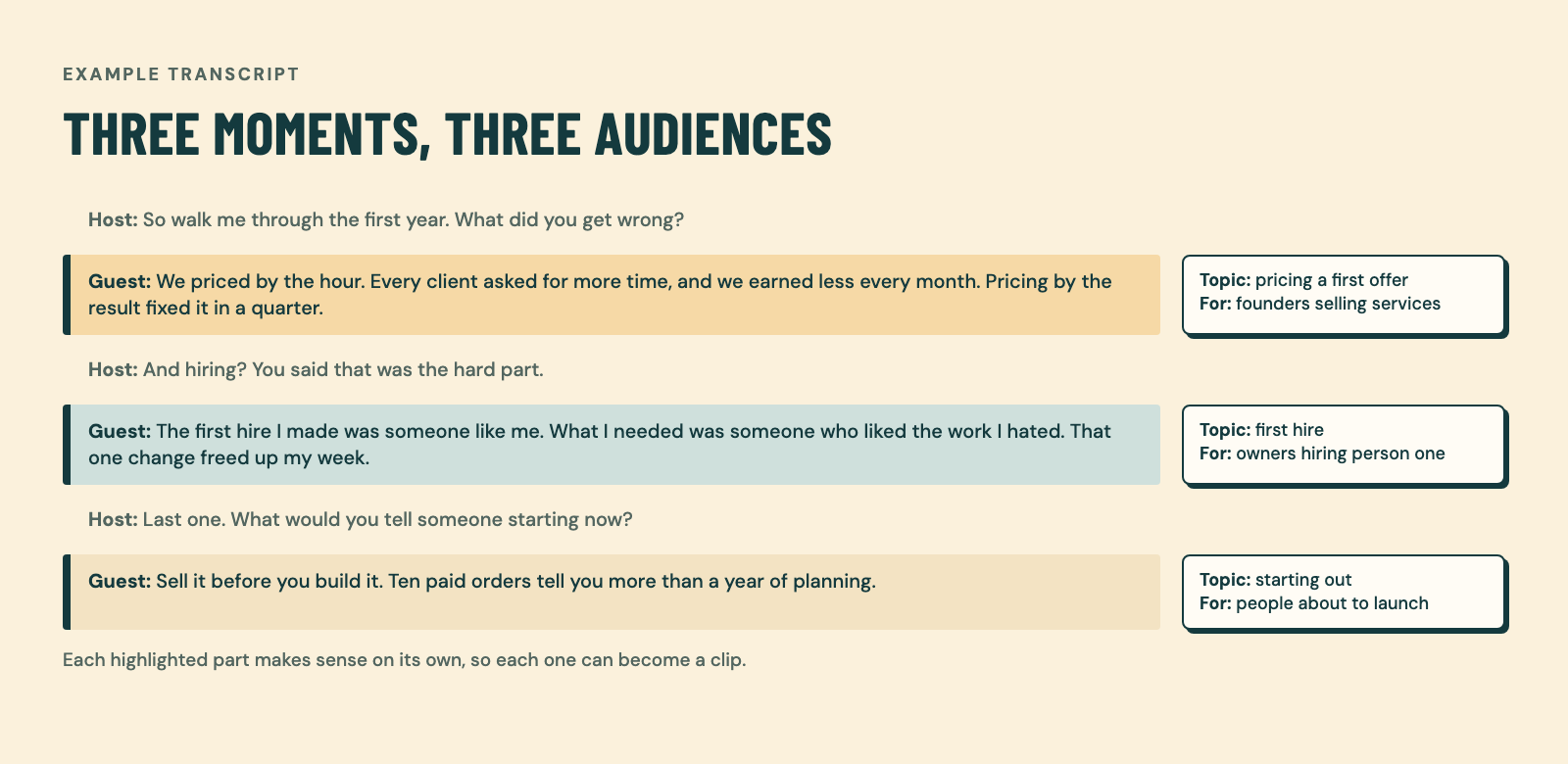
Two habits save hours here. Read the transcript before you watch the video, because skimming text is faster than scrubbing a timeline. And ask the host to send timestamps of moments they loved. One commenter in the same r/podcasting thread suggested exactly that, so editors don’t have to watch the whole episode to find a good moment at 31:45.
Step 3: Cut it so it works with no context
Once you’ve found the moment, the test is simple: can someone understand it with no context? If they can, you’re doing well.
This is where podcast clips most often fail. The guest says something sharp, but it only lands if you heard the question three minutes earlier. Or they say “like I said before,” and the viewer is lost.
To cut for no context:
- Start on the claim, not the warm-up. Cut “yeah, so, great question” and start at the first sentence that says something.
- Remove references to earlier in the episode. “As I mentioned” and “going back to that” don’t work for a stranger.
- Keep it broad enough. A clip can be about a technical topic without being full of jargon. Aim for the version an outsider can follow.
- End when the idea ends. Don’t trail into the next topic.
Not every clip has to be context-free. Clips for your core audience can assume more, and if your target viewer comes by, they’ll get it. But the clips you use to reach new people should work cold.
The first three seconds start before you record
Most advice on hooks says “grab attention in the first three seconds.” That’s true, but it doesn’t tell you how. The answer is that hooks, captions and framing are mostly decided in pre-production.
Prepare your questions in advance. Don’t send the guest the exact questions, or the answers will sound rehearsed. Send them the themes and the general direction instead, and keep the questions for the recording.
Then, in the pre-call or the virtual green room before you record, give the guest one instruction: put the question in your answer.
Here’s the simple version. If I ask, “What’s your name?” most guests say, “John.” That answer is useless as a clip, because without my question nobody knows what “John” means. If the guest says, “My name is John,” the answer stands on its own.
Apply that to every question. “What’s the biggest mistake new founders make?” gets “The biggest mistake new founders make is hiring too early,” not “Hiring too early.” Now the clip opens with its own hook, and you didn’t have to add a text box to explain it.
It takes 30 seconds to explain to a guest, and it changes every clip you cut from that episode.
Captions and framing
Once the moment is cut, two things decide whether people keep watching: can they follow it with the sound off, and can they see who’s talking.
- Captions: add them to every clip, so people can follow it with the sound off and keep up with fast talkers. Keep them large, short, and timed to the speech.
- Framing: for vertical platforms, crop to the person talking and keep their face in the upper part of the frame, clear of the platform’s buttons and caption text.
- Text on screen: if the guest put the question in the answer, you rarely need a headline. If they didn’t, a short line at the top can do that job.
Every Episode Kit includes short-form clips with humanised captions.
How long should podcast clips be?
There’s no fixed length. Clips need to get the point out in the shortest time possible, but one idea gets the room it needs. If an idea takes a little longer, give it a little longer.
Most guides give you a number, and the numbers don’t agree. You’ll see 15 to 60 seconds, 30 to 90 seconds, and “keep it under 60 seconds for Shorts.” That last one is out of date: YouTube now allows Shorts up to three minutes long for videos uploaded on or after October 15, 2024 (YouTube Help). Platforms copied TikTok, then built room for longer videos. A 60-second cap is a habit, not a rule.
That doesn’t make long good. A guest who talks in long loops will give you long clips that bore people. The rule is the same for every guest: cut until the idea is complete and nothing else is left.
It helps to think in three lengths, because each one does a different job:
| Form | Shape | What it’s for |
|---|---|---|
| Short form | Vertical, one idea | Discovery on Shorts, Reels, TikTok and LinkedIn |
| Mid-form | A full segment, often several minutes | A complete answer for people already interested |
| Long form | The full episode | Your core audience |
On Where She Goes Next, one of the shows we produce, the top Short had an average watch of 1:46 (YouTube Studio, to 24 Sep 2026). That’s well past the old 60-second limit, and people stayed.
How many clips per episode, and where they go
There’s no magic number of clips per episode, but there is a floor: enough to test which ideas land with your audience.
One r/podcasting host described their routine: an hour-long episode gives 5 to 8 clips of 30 to 60 seconds, posted one or two a day, always linking to the full episode. They also post 10 to 15 minute segments to YouTube later in the week (r/podcasting: a weekly clip routine). That’s short form and mid-form working together.
Here’s what that looks like in our work:
- The Episode Kit includes 3, 4 or 5 short-form clips, depending on the length of the raw recording (see the kit sizes).
- For PIC Conversations, a weekly show for CPG founders and operators, we turn each recording into a package with four captioned vertical clips per episode.
- For the Inside Mechro episode of Field Notes, Gitwit’s podcast for operators, we made the main video, an MP3, lower thirds and 10 captioned vertical clips.
Where they go depends on step 1. Post where your audience already watches, and post the same clip natively on each platform instead of sharing a link. Then link the full episode in the caption or first comment, because a clip that doesn’t point anywhere is just content. You can see sample clips from past shows.
Podcast clip maker vs. a person: where each one fails
Two or three years ago, we’d always have picked a person over an AI clip tool. The tools have gotten better since. They still fail in different places from people, and it helps to know where.
Here are three tools that show up when you search for a podcast clip maker, with prices from their own pricing pages at the time of writing (November 2026):
| Tool | What it is | Paid plans from |
|---|---|---|
| OpusClip | AI tool that cuts long videos into short clips | $15 a month (Starter) |
| Riverside | Recording and editing platform with Magic Clips | $24 a month billed annually, or $29 monthly (Pro) |
| Descript | Transcript-based editor with clip tools | $16 per person a month billed annually, or $24 monthly (Hobbyist) |
Where AI clip tools fail:
- They don’t know your audience. Unless the tool asks who the clip is for, it picks what looks engaging in general. That’s step 1 skipped.
- Long episodes are a big input. An hour of conversation is a lot for an AI model to hold at once. Earlier models had less room, so a long episode filled most of it and the picks got worse. Newer models can take in far more at once, which is one reason the tools have improved.
- Credits are rationed. Subscription tools pay for every minute they process and need to make a margin. In our view, that’s part of why paid plans come with credit limits, and why some tools may not run the strongest model on your episode.
Where a person fails:
- Time. A person reading the transcript, finding the moment and cutting it takes hours per episode. On Reddit, one creator said manual clipping took them 5 to 6 hours an episode (r/podcasting: hours of manual clipping).
- Guessing. A person who doesn’t know the audience fails the same way a tool does, just slower.
The quality you get is the quality you pay for. Two services can sell the same thing while running very different setups behind it. So you’re not really choosing a model. You’re choosing who to trust: understand how they work and what they run. If they don’t understand that themselves, the clips will show it.
Questions
How long should a podcast clip be?
As long as one idea needs, and no longer. Get the point out as fast as you can, but don’t cut an idea short to hit 60 seconds. YouTube Shorts can now run up to three minutes, so the old cap no longer applies there.
How many clips should I make from one episode?
Enough to learn what your audience responds to. The host quoted above makes 5 to 8 short clips from an hour-long episode, plus 10 to 15 minute segments for YouTube. The Episode Kit includes 3, 4 or 5 clips, depending on recording length.
Are AI podcast clip makers good enough?
For a first pass, often yes, and they’re improving fast. They still don’t know who your audience is unless you tell them, and cheaper plans ration how much they process. Check every clip they pick against step 1 and step 3 before you post it.
Do podcast clips bring in new listeners?
They bring in attention first. Clips put your show in front of people who’ve never heard of it, and some of them go on to the full episode. Link the episode in every caption, and judge clips by comments, saves and profile visits, not views alone.
Make clips your audience stops for
Good podcast clips start with the audience, come from one clear idea, and work with no context. Set up the hook before you record, cut until only the idea is left, and post where your people already watch.
If you’d rather hand that work off, send us the recording. The Episode Kit turns one episode into an edited video and podcast audio, captioned short-form clips, a thumbnail, show notes, social posts and a newsletter recap, delivered 5 business days after you upload it and complete the brief.